Introduction
As part of clinical workflows, doctors often need to review patient history to determine their conditions and potential treatment options. In addition to evaluating a current patient’s condition, the trend of a condition over time (e.g. improving, deteriorating, stable, or fluctuating) is important too. A clinician reviewing multiple test reports must open each one, read it, extract relevant information, and mentally grasp the current condition and trend. This process is time consuming and inefficient.
In order to simplify the review of a patient’s history, we developed the capability to extract key attributes from clinical reports and present them to the clinician in summarised form — a table and plot. These provide information-at-a-glance, while allowing the clinician to explore details of each test. The original reports are also available for reference.
This article describes the technical background and key steps that we took to develop the capability, as well as insights, which we hope will be useful for others.
Problem statement
The problem statement describes at a high level what we set out to achieve, from both a clinical and technical perspective.
User problem statement: Clinicians spend a significant amount of time manually extracting and interpreting information from clinical test reports, leading to wasted time and loss of capacity.
Technical problem statement: Develop an AI-driven system that can accurately extract key information from clinical test reports and visualise it in an intuitive interface.
The benefit of developing with a working user interface
Common sense, and various design methodologies, such as design thinking, suggest that prior to developing a product, the team should go into consultation with stakeholders, work through the use-cases, and ideate potential solutions.
While following a user-centric mindset, we executed the process in quick cycles, similar to the “Ready, Fire, Aim” approach described by Andrew Ng. He makes the point that as the cost and effort required for iterating on AI concepts are fairly low, it is often more efficient to develop concepts, get feedback, and change direction if needed, than to perform complex research before building the first prototype, and only then getting feedback.
The initial research phase of report summaries was minimal, quickly engaging in ideation and prototyping. The idea was conceived by a cross-functional team that included both technical and clinical experts. At that stage it was just an idea. Very early on in development, when there was only a basic capability of information extraction, it was embedded into a basic user interface.
Having the prototype embedded within Atidia’s ‘Patient Optimiser’ application (POP) enabled a very quick cycle of review by clinicians, feedback, and improvement. The iterative process of determining what information to extract and improving the quality of extraction was interleaved with determining how the extracted information would be presented. These activities fed into each other — looking at a plot, clinicians could identify what would be useful to add or modify, which informed the data extraction and vice versa.
We were not seeking feedback on colour or design, but whether the extracted information was indeed useful, or how it could be represented. This helped, for example, to narrow down the specific entities to extract; there are dozens of possible information bits that can be read from the reports, but only the top 5-6 were most useful.
How can Large Language Models do this
Large Language Models (LLM) have been used in a variety of applications, most famously as chatbots, such as chatGPT. These chatbots leverage the LLM’s ability to interpret a prompt written in natural language (e.g. English) and respond with a meaningful answer, also in natural language. This ability to ‘understand’ and respond to human language can be leveraged for other purposes too. For example, in health, it can be used to extract clinical information from a report written in natural language.
As clinical test reports are written in natural language, results can be phrased in multiple ways, e.g.
- using technical and non-technical terms,
- using different methods to represent measurements, or
- including different sets of metrics in reports of the same type of test
Consequently, extracting specific information using rule-based software can be extremely challenging.
While LLMs may not really ‘understand’ the text that they read, they do present an ability to extract meaningful information by predicting the most likely token related to a given prompt as well as their own response. LLMs are trained on a vast number of examples, which means that alternative versions of the same concept are likely to appear.
For example, the terms ‘kilogram’ and ‘kg’ would both appear when measuring weight. When either version is seen by the LLM, together with other tokens that indicate weight, the LLM would predict that the previous token, i.e. the number preceding the ‘kg’ or ‘kilogram’ indicates the weight. From an information extraction perspective, this is equivalent to understanding that ‘kilogram’ and ‘kg’ mean the same thing and both deal with weight.
This is context dependent, as one acronym could represent different concepts in different domains. However, if the text includes sufficient domain specific information, the prediction could narrow the meaning down to the commonly understood meaning in that domain.
Given sufficient information in the prompt, LLMs can be used to extract values from a report, which indicate patient conditions, measurements and results. Once extracted, these can then be used in a structured form e.g., as numbers in a table or graphical plot.
What does a report look like?
The format and content of clinical test reports can take many forms. The reports may be provided in different file types, such as PDF, images etc. For simplicity, we’ll focus on the text content.
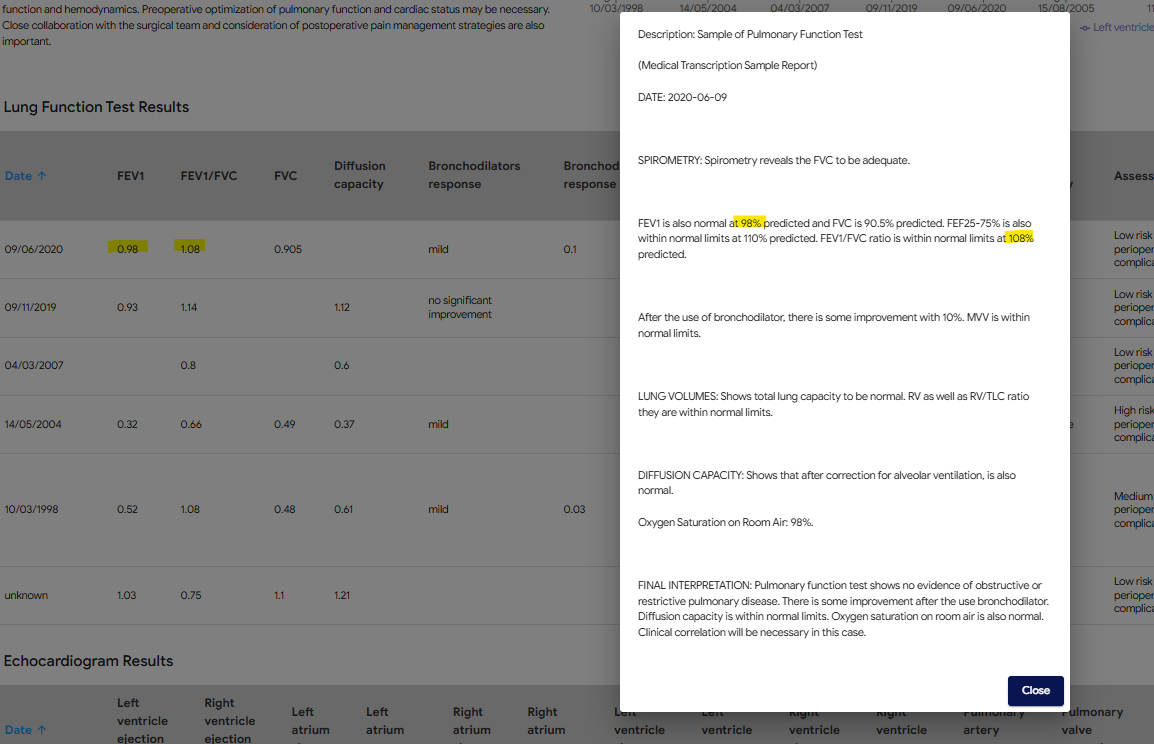
The examples below illustrate how different reports of the same type of test (in this case, pulmonary function test) can have not only different results, but also different headings, measurements and numerical representations e.g. numbers vs percentages.
What entities are useful to extract?
Determining what entities to extract depends on how the information will be used. For example, what elements would be useful for a clinician to determine whether a patient has an obstructive lung condition?
This perspective was provided by the senior anaesthetist on the team, who advised some key factors to extract:
- FEV1 — Forced Expiratory Volume, which is the air you exhale in 1 second
- FVC — Forced Vital Capacity is the amount of air that can be forcibly exhaled from your lungs after taking the deepest breath possible
- FEV1/FVC ratio — useful in differentiating between obstructive and restrictive lung conditions
It is apparent that reports use different expressions for the same measurement. The meaningful entity to extract is the ’% predicted FEV1’, not the ‘measured amount FEV1’. This distinction is important to deliver the information that clinicians require.
Understanding which figure is meaningful informs the instructions provided to the LLM. If the prompt requests the ‘FEV1’ value, the LLM may return either the number or the percentage. Instead, the prompt should specify that the required entity is the % predicted. If that entity is not available, it may be better to return the value of ‘unknown’ than to return a number, which would not be comparable with % predicted from other reports.
How to extract entities
The process of prompt engineering to extract entities from clinical reports is more of an art than pure engineering, although the experimentation process can be done systematically to accelerate it.
There are various online tools that assist in crafting prompts and exploring the results. A popular one is openAI’s playground. The UI allows you to provide a system prompt and user prompt: the system prompt can be used to provide instructions on which entities to extract; The clinical report, which changes on every execution, can be provided in the user prompt.
As with other prompting tasks, the system prompt should set the context for the task. It can also describe the entities to extract and the format in which they should be returned.
When you insert a report and run the prompt, you will get a response and will be able to evaluate how effective it is, modify the system prompt, and run it again. The more specific you are about the information you need and the format in which it is returned, the more specific and useful the responses will be. However, it’s not as simple as ‘more is better’. Sometimes including more information can bias the response or cause it to hallucinate. You will need to experiment with the prompt to find the best instructions for your use case.
For example, we experimented with multiple prompting methods:
- No example output provided — the model extracted some entities but was inconsistent in its output.
- Provide an example — the example confused the model, sometimes it replied with information that was in the example but not in the report. Generalising the example, by using placeholders instead of specific examples, addressed this issue.
Streamline integration with JSON responses
Typically, the response of an LLM needs to be processed before it can be used in your application. In the case of information extraction, the textual response needs to be converted to a structured data object, so that application logic can use it.
You can guide the LLM to represent the response in a way that is easy to use, for example a JSON dictionary. Some LLM API’s include a ‘JSON mode’ that will ensure the response is in valid JSON format. In other cases it will be up to you to prompt appropriately and handle cases in which the response is not in the expected format.
Challenges
Allowing the LLM to ‘not’ know
Because LLM responses are based on selecting the next token based on probabilities, they can appear too ‘eager’ to provide an answer, even if the answer is not correct. This can lead to ‘hallucinations’, which would appear as the extraction of incorrect entity values. One way to deal with that is to include instructions for the LLM to explicitly indicate which values are unknown (e.g. low probability), so that it overrides the tendency to populate false values.
Different models respond differently
This may seem obvious, but worth noting that different LLMs respond differently from each other. This makes sense as they may have different architectures and may be trained on different data.
One example is that as new generations of LLMs are released, their ability to effectively extract information from text can improve. When development began, we used the OpenAI API to prompt ChatGPT. At the time, version 3.5 was available and prompts worked fairly well. However, when the text was somewhat ambiguous, the model often extracted the wrong value.
Then GPT4 became available, and that problem went away. It seemed better at differentiating between technical acronyms, and identified when a measurement was not present, responding with the value ‘unknown’ (as instructed).
This is a positive example that worked in our favour. However, in other cases, the difference between LLMs can require a change to prompts in order to achieve the expected results. Swapping out one model for another requires testing and verification to ensure that product functionality is not negatively impacted.
What does performance mean and how to check
There can be various ways to define the performance of entity extraction and summary, depending on the relevant criteria for your use case. As in other machine learning projects, accuracy, precision, and recall are relevant metrics.
These metrics are easy to define in simple classification problems. In attribute extraction, they can be confusing. You may need to consider how to define what a ‘true positive’ or ‘false negative’ means in your scenario:
- Positive: a required attribute that exists in the text
- Negative: a required attribute that does not exist in the text
- True Positive: the model correctly extracted a required attribute, with the correct value
- False Positive: the model assigned an incorrect value to a required attribute
- True Negative: the model correctly identified that a required attribute does not exist
- False Negative: the model incorrectly reported that a required attribute does not exist, even though it is present
Another perspective of ‘performance’ relates to the user’s perspective — accuracy vs consistency (or reliability):
- Accuracy: given a clinical report, how likely is the model to extract the correct set of entity values.
- Consistency: given a clinical report, how likely is the model to extract the same set of entity values every time it is called.
What would be more useful to the user: a model that sometimes performs at 90% accuracy and sometimes at 50%, or a model that always performs at 80% accuracy?
The result — visualising condition trends with AI
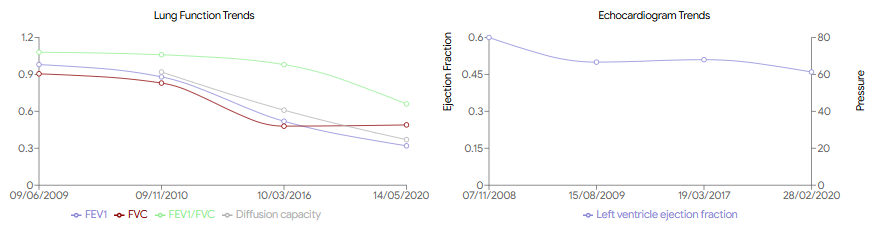
The ability to extract information from test reports has allowed the development of functionality to save time and improve clinical overview. Data from test reports uploaded to POP is displayed in a copilot screen in two forms:
- Plots that visualise the progress of important results over time
- A table that provides numerical data and additional information, including the original report
This replaces the need for a clinician to manually read each report and remember or write down the relevant content, and then combine that information into a trend over time.
Confidence, enabling informed clinical judgement
While AI provides powerful tools for data summarisation and visualisation, it does not replace the expertise of clinicians. POP presents both summaries and original reports, allowing healthcare professionals to apply their own judgement to the AI-generated insights. This dual approach ensures that clinicians have all the information they need to make informed decisions while benefiting from the efficiency and accuracy of AI.
What’s next?
The capability described in this article opens various opportunities for improvement and applications in other parts of the clinical workflow. An obvious expansion is to include additional types of test reports. It could also be used to extract information from other types of documents, such as referral letters, clinical notes, and questionnaires.
At a higher level, we would like to validate these capabilities on a broader patient population and use cases, to explore how it could be generalised.
This work, while implemented in a clinical platform, lends itself to collaborative research. If you are working on similar capabilities, or would like to explore using this approach in your institution, let us know — it would be great to chat!
References and further reading
- Design Thinking by Stanford d school and Ideo
- Andrew Ng “Ready, Fire, Aim”: Concrete Ideas Make Strong AI Startups
- Large Language Models are Few-Shot Clinical Information Extractors (arxiv.org)
- Clinical report examples — MTSamples
- A Stepwise Approach to the Interpretation of Pulmonary Function Tests
- Demystifying LLMs — The GitHub Blog
- OpenAI Playground
- Analyzing next token probabilities in large language models (Google)